



AI agents have been everywhere lately: in every product announcement, every LinkedIn post, every "the future of work" newsletter you've half-read this year. OpenAI launched them. Google launched them. Your company's engineering team probably has a Slack thread about building one internally that's been going since Q1.
And every time it comes up, the conversation quietly shifts to the tech team. Because "AI agents" sounds like infrastructure. But here's the thing: it's not that complicated. Not anymore.
You can build a working AI agent today, one that actually does something useful for your marketing workflow, with no code, a free account, and about 30 minutes. This blog will show you exactly how.
But before we get into the tools, some numbers worth knowing:
- 51% of marketers use AI tools to optimise content, including email campaigns and SEO.
- Marketers using generative AI report saving more than 5 hours per week on content creation tasks alone.
- G2's 2025 AI Agents Report found a median 23% gain in speed-to-market, with velocity gains of up to 50% in marketing and sales use cases.
- By 2028, at least 15% of day-to-day work decisions will be made autonomously through agentic AI, up from essentially zero last year.
The last one is the real kicker. Not "AI will help you write captions faster." We're talking about AI systems that make decisions inside your workflow. That's a different animal.
How Agents Actually Think
But first, let's get the definition out of the way, because it's actually pretty simple: an AI agent is a system that takes a goal, figures out the steps, uses tools, and acts, without you micromanaging every move.
It's not ChatGPT waiting for your next prompt. It's something closer to a junior team member you've briefed well: give it a job, it goes and does it.
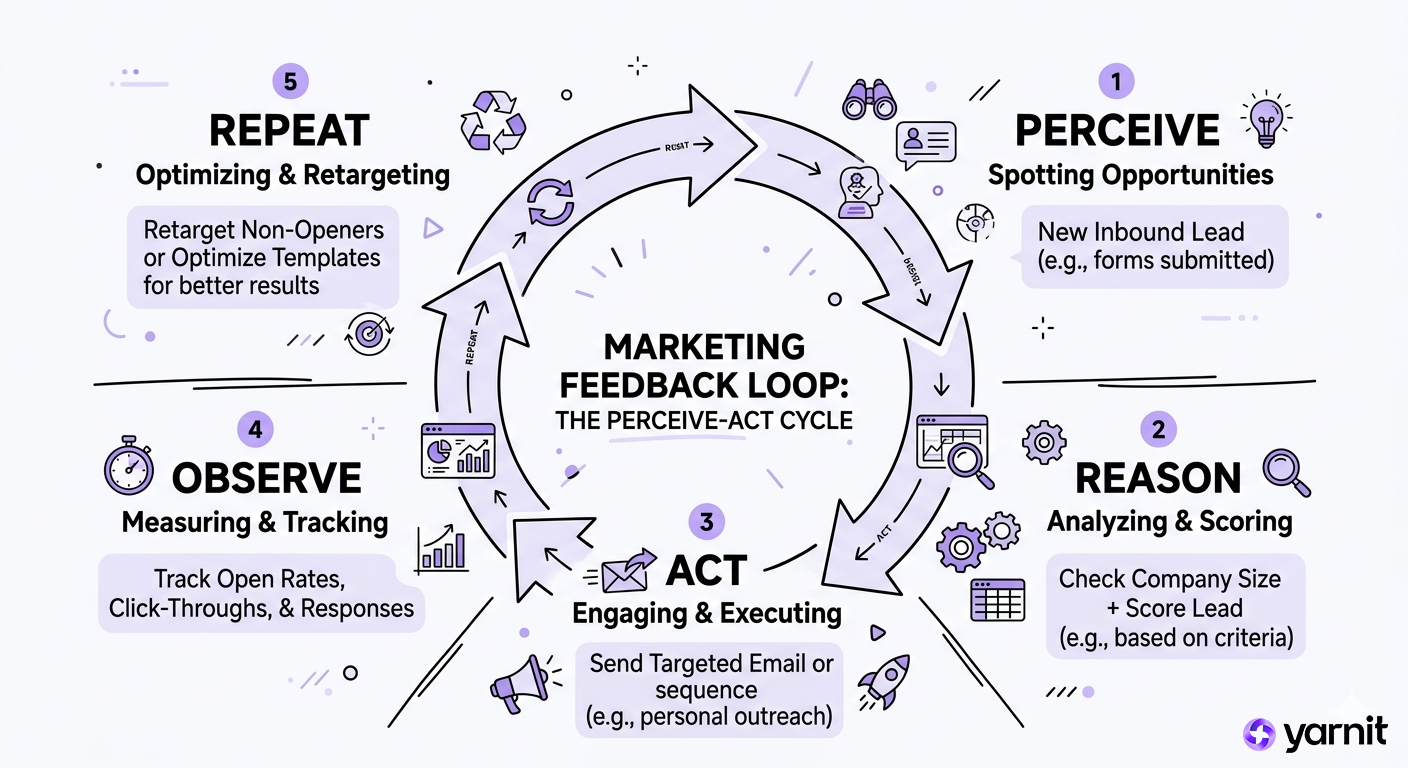
Every AI agent, no matter the platform, runs on the same basic logic loop:
Perceive → Reason → Act → Observe → Repeat
- Perceive: the agent gets a goal or a trigger ("a new lead filled the form")
- Reason: it figures out what needs to happen ("I should score this lead, check their LinkedIn, and draft a personalised email")
- Act: it uses tools to do those things (CRM API, LinkedIn scraper, email draft)
- Observe: it checks if it worked
- Repeat: it loops until the goal is done or it hits a wall
The magic ingredient is the system prompt, the set of instructions you write that tells the agent who it is, what it's for, and what it should never do. Think of it as your employee onboarding doc, except this employee never forgets what you wrote.
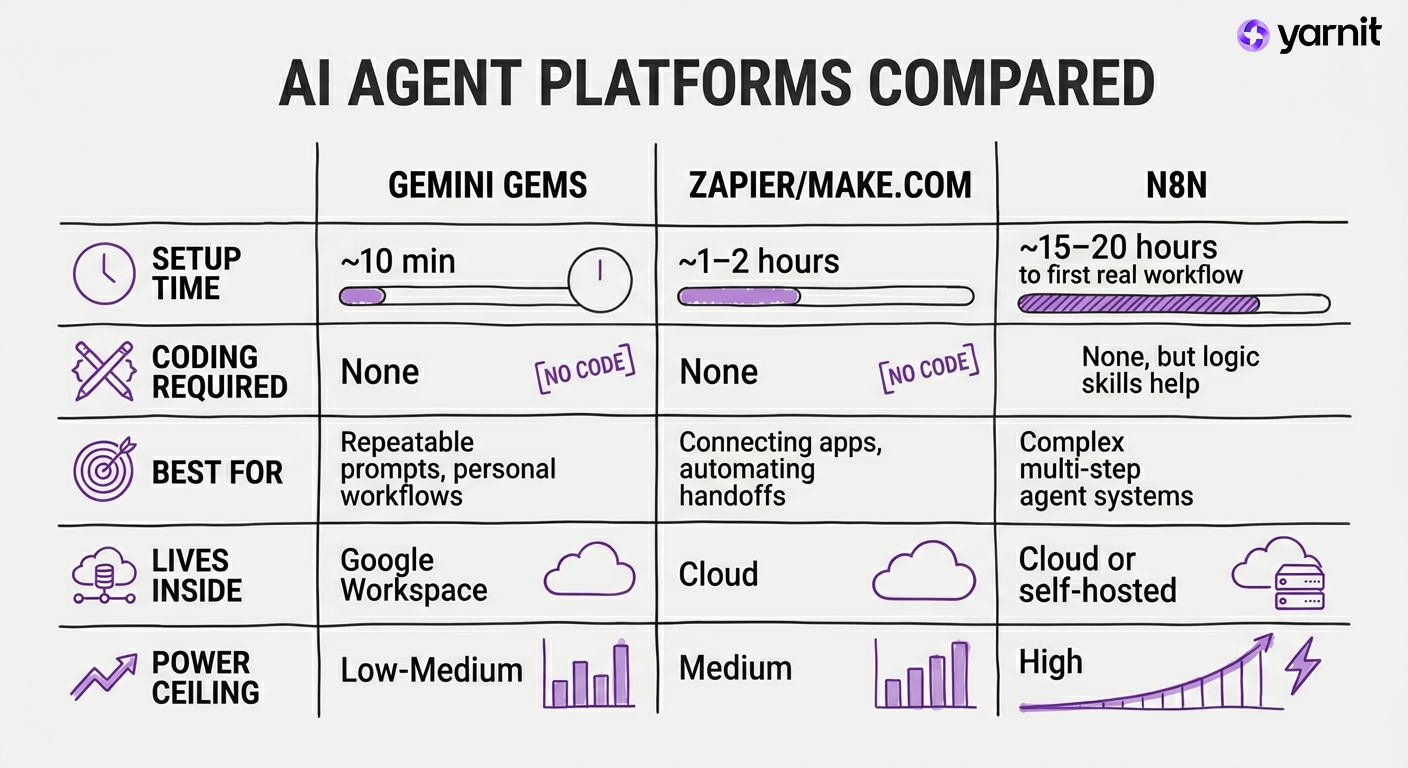
Top AI Agent Tools Compared: Beginner to Advanced
There's a spectrum here, from "I can do this in 10 minutes" to "I need a Saturday afternoon and a YouTube playlist." Here's the honest map:
Now let's build something with all three. Same workflow, different tools.
Our demo workflow: When a competitor publishes a new blog post, summarise it, extract 3 key takeaways, and draft a response angle for our own content team.
Tool #1: Google Gemini Gems
Gems are Gemini's version of a saved, customised AI persona. Instead of repeatedly telling a general-purpose AI "I need you to act as a marketing expert, with a professional yet friendly tone, and give me three content ideas for a new product launch," you create a "Content Strategist" Gem once. Every time you open it, it already knows its persona, tone, and purpose.
This is not a full agent in the autonomous sense, it won't go fetch competitor posts on its own. But it's the fastest way to get repeatable, high-quality AI output for your team.
How to build your Competitor Intelligence Gem:
- Go to gemini.google.com → click Gem manager in the left sidebar → + New Gem
- Name it something useful: Competitor Content Analyst
- In the Instructions box, paste this system prompt:
You are a senior content strategist for a B2B SaaS marketing team.
When I paste in a competitor's blog post, you will:
1. Summarise it in 3 bullet points (max 20 words each)
2. Identify the core argument or narrative
3. Suggest 2 angles we could use to write a stronger, differentiated post
4. Flag any claims that seem exaggerated or worth fact-checking
Tone: analytical, slightly sceptical, commercially sharp. No fluff.
- Hit the magic wand icon to let Gemini expand your instructions if needed
- Click Add files to upload your brand guidelines, past blog posts, or a competitor list for added context
- Test it in the preview pane → Save
Now paste any competitor article into that Gem and watch it work.
When to graduate: The moment you think "I wish this would just run automatically every Monday": that's your cue to move to the next tier.
Tool #2: Zapier (or Make.com): Connect the Dots
Zapier's strength is making non-technical employees build sophisticated automations in minutes. You can automate tasks like lead nurturing to sales teams connecting CRM data across multiple systems. Make.com skews slightly more powerful for complex branching logic but has a steeper curve.
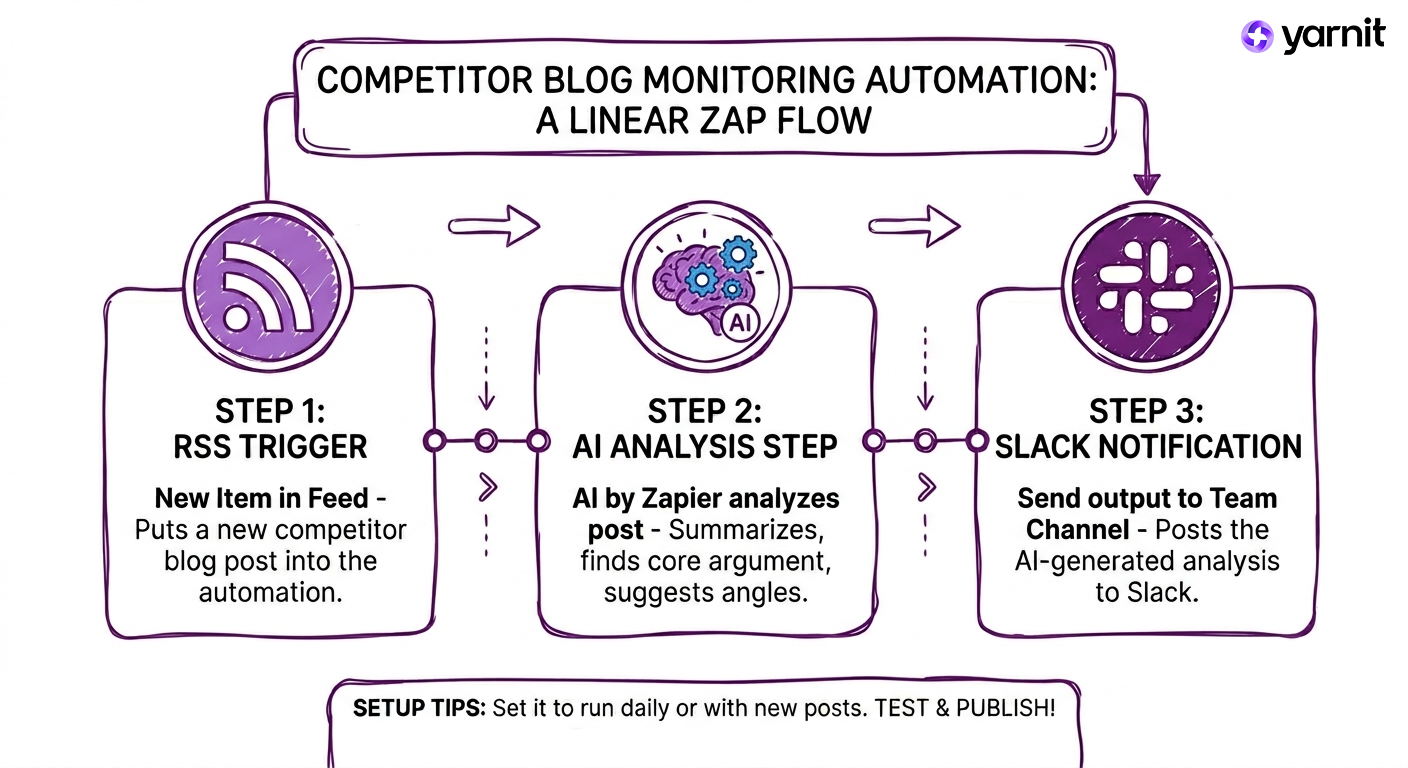
For the competitor monitoring workflow, Zapier gets us closer to actual agent behaviour: trigger → AI step → output.
How to build a Competitor Monitor in Zapier:
- Sign up at zapier.com → + Create → New Zap
- Trigger: RSS by Zapier → New Item in Feed → paste your competitor's blog RSS URL (most sites have one at /feed or /rss)
- Action 1: AI by Zapier → Analyze Text: paste this prompt:
Summarise this blog post in 3 bullets. Identify the core argument.
Suggest 2 content angles we could use to respond.
Post title: {{title}}
Post content: {{content}}
- Action 2: Gmail or Slack → send the AI output to your content team's channel
- Set it to run daily or whenever a new post appears
- Test → Publish
Total time: under an hour if you don't get distracted by all the other templates.
Make.com alternative: Make's scenario editor supports unlimited routes and branching logic, so if you want to add a step like "if the post mentions a topic we cover, also create a draft task in Asana," Make handles that more elegantly than Zapier.
When to graduate: When you need the agent to make decisions based on what it finds, not just relay information, it's n8n time.
Tool #3: n8n: The Real Deal (With a Learning Tax)
Every n8n tutorial lies about timelines. They show you a 5-minute demo. Then you try it and spend 20 hours stuck. The truth: n8n has a real learning curve. Expect 15–20 hours to your first working automation. But hour 21? You'll be building things faster than you ever could in Zapier.
Fair warning given. Here's why it's worth it.
Unlike traditional automation workflows that require manual setup for each content type, n8n agents can adapt their output format based on the target platform and audience. You can plug in OpenAI, Claude, or Gemini as the reasoning engine, connect to your own database, add memory so the agent remembers past interactions, and build multi-step logic that would make Zapier cry.
Our competitor workflow in n8n (the upgraded version):
- Sign up at n8n.io → start with n8n Cloud (skip self-hosting for now)
- New Workflow → add a Schedule Trigger (every Monday 8am)
- Add an HTTP Request node → pull your competitor's RSS feed
- Add an AI Agent node → connect it to your LLM of choice
- Write the system prompt:
You are a content intelligence agent. When given a list of competitor blog posts:
- Score each for relevance to our audience (1–10)
- Summarise the top 3
- For posts scoring 7+, suggest a counter-article angle
- Output as structured JSON
- Add an IF node: if any post scores 8+, route to a Slack alert + create a task in your project management tool
- Add a Google Sheets node: log every post and score for a running database
The key difference here is that n8n's AI Agent node can use tools. It can search the web, query your database, and call APIs as part of its reasoning.
Prompting tip that actually matters: Be specific about format. Agents that output "JSON with the following fields: title, score, summary, suggested_angle" are far easier to route downstream than agents outputting freeform text. Structure your prompt like an API contract.
How to Prompt AI Agents: 5 Key Tips
The tool changes. The logic doesn't. Here's what actually makes an agent work:
- 1. Give it a persona, not just a task. Bad: "Summarise this article." Good: "You are a B2B content strategist. Summarise this article from the perspective of someone building a counter-narrative campaign."
- 2. Define the output format upfront. Agents downstream need to parse what the agent upstream produces. Bullet points, JSON, tables: pick one and specify it explicitly.
- 3. Tell it what NOT to do. "Do not include opinions" or "never recommend a tool we don't use": guardrails are as important as instructions.
- 4. Build in a reason to ask for clarification. If the input is ambiguous, tell the agent: "If the post is less than 300 words, ask me for more context before proceeding."
- 5. Iterate on the system prompt like you iterate on a campaign. Your first version will be okay. Your fifth will be good. Your tenth will feel like you hired someone.
Scaling AI Agents for a Company-Wide Deployment
Here's the honest ceiling: what you've just built is a personal productivity win, or at best a team shortcut. And that's genuinely valuable.
But when marketing starts asking "can we connect this to our CRM?", and sales asks "can the agent update the brief in our DAM?", and leadership asks "can we track what content the agent is producing and measure its ROI?", that's when your Gem or your Zap runs out of road.
Company-wide AI is a different problem. It's not about automating one workflow. It's about building agents that are plugged into your actual marketing infrastructure, your brand guidelines, your audience data, your content calendar, your approval chains, your compliance rules.
That's where Yarnit for Enterprise comes in.
Yarnit is built for marketing teams that have moved past the "cool demo" phase and need AI that works within their existing stack, not around it. It brings together brand voice, audience intelligence, multi-format content generation, and workflow integration into a system your entire marketing team can actually use. Not just the one person who figured out n8n on a Saturday.
The agents you build today? They teach you logic. Yarnit gives you the tools you need to scale it. Reach out to us to know how we can help you build your next intelligent workflow.


