Features \ Campaign manager

Yarnit Campaign Manager Your AI Marketing Command Center

Transform your campaign briefs into ready-to-launch content in minutes. Yarnit Campaign Manager combines strategic planning, content creation, and execution in one intelligent workspace powered by specialized AI agents.

User interface of a campaign management tool showing a blog post list with status tags, generate buttons, and a panel for editing blog details including title, format, and description.
Why Campaign Manager

Strategy Meets Speed

Cut campaign planning and content creation time by 70%. Go from brief to complete campaign assets in hours instead of weeks, without sacrificing strategic depth

Intelligent Orchestration

Let AI agents handle the heavy lifting - from research and planning to content creation and optimization. Your team stays focused on high-value strategic decisions

Complete Campaign Control

Manage everything from one dashboard - planning, creation, approvals, and scheduling. No more juggling tools or losing track of campaign elements.

Blank white web interface with a vertical sidebar on the left containing three icons: a purple swirl, a square grid, and a life preserver at the bottom.

SEO Content Campaigns

Plan and create comprehensive SEO campaigns targeting your key terms. Generate pillar pages, supporting blog posts, meta descriptions, and internal linking strategy - all optimized for search.

Social Media Campaigns

Launch engaging social campaigns across platforms. Create themed post series, platform-specific content, hashtag campaigns, and engagement-driving carousels that build your brand.

Product Launch Spotlight

Orchestrate full-scale product launches. From announcement blogs to demo videos scripts, from feature highlight posts to technical documentation - get every asset you need.

Lead Magnet Campaigns

Create high-converting lead generation campaigns. Generate ebooks, craft nurture email sequences, design webinar content, and develop supporting social promotion materials.

Brand Story
Series

Tell your brand story across channels. Create company milestones content, team spotlight series, behind-the-scenes features, and value proposition pieces.

Event Marketing Suite

Build buzz around your events. Plan pre-event teasers, speaker highlight content, live-event coverage materials, and post-event engagement content.

Blurred abstract image with dominant purple hues and circular light effects.
Use CASES
Core Features

Campaign Foundation Builder

Define campaign objectives, KPIs, target audience, and channels in one streamlined brief. Set the strategic foundation for focused, goal-driven content creation.

Popup on campaign creation screen with layered graphic, text 'Start a new campaign Your campaign will appear here,' and a purple 'Generate Campaign' button.

Smart Content Planner

Get AI-generated content calendars and publishing plans customized to your campaign goals and audience preferences. Select content types and timelines that work for you.

Schedule post interface with time zone selection, options to publish on LinkedIn and Facebook selected, and buttons for Instagram and X, plus a purple button labeled Add Due date.

Brief Refinement System

Review and fine-tune your content briefs before generation. Add, modify, or enhance content pieces to align perfectly with campaign objectives.

Chat interface from Yarnit showing a prompt about developing a blog post plan to showcase AI-powered storytelling, with options for blog post plan versions 1 and 2.

One-Click Content Creator

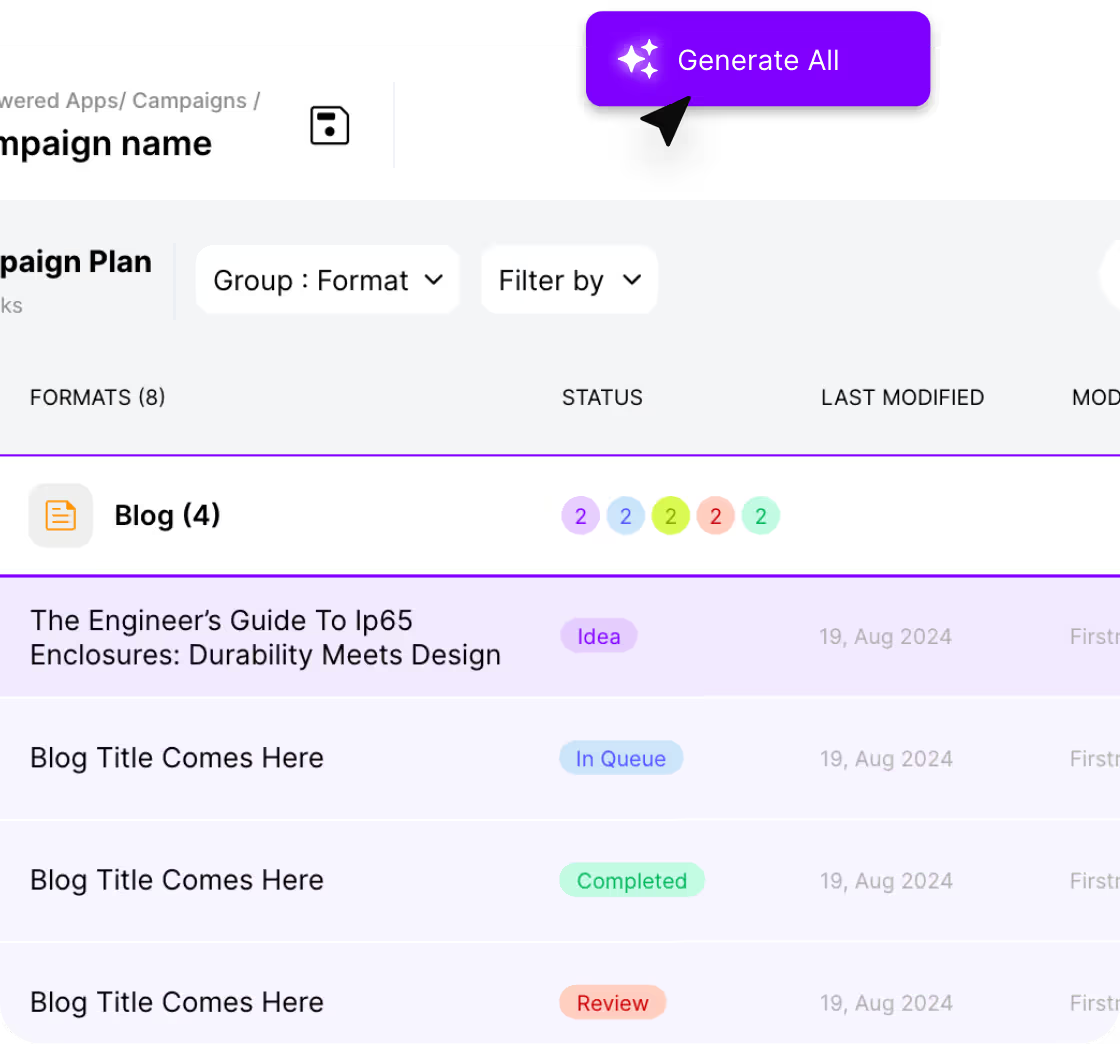
Transform your approved briefs into ready-to-use content with a single click. Generate multiple content pieces simultaneously across different formats.

Dashboard showing blog campaign plan with four blog entries, each with status tags: Idea, In Queue, Completed, Review, and a purple Generate All button.

Campaign Dashboard

Track content status, monitor generation progress, and manage your campaign workflow from one intuitive interface. Keep your entire team aligned & on schedule.

Screenshot of a campaign planning app showing a blog format section with four blog tasks, each with different status labels: Idea, In Queue, Completed, and Review.

Team Collaboration Space

Work seamlessly with your team to review, refine, and approve campaign content. Maintain clear communication and workflow transparency throughout the campaign.

User interface showing a list with photos and names of Joe Spencer, Tina, and Alex Kay with role tags Marketing Lead, Designer, and CopyWriter connected by arrows.
Product FAQ’s

Frequently Asked Questions

What types of content can Campaign Manager create

Campaign Manager can create blogs, social media posts (LinkedIn, Twitter, Instagram, Facebook), email sequences, landing page copy, ad copy, and downloadable content like ebooks and whitepapers. Each content type is optimized for its specific channel while maintaining consistent campaign messaging.

What information do I need to provide to start a campaign?

To start a campaign, you need to provide: campaign objectives, target audience details, preferred channels, KPIs, campaign timeline, and any specific brand guidelines or requirements. The more context you provide, the better aligned your content will be.

How many content pieces can be generated in one campaign?

Each campaign can include up to 50 content pieces across different formats. For example, you could create 1 whitepaper, 20 social media posts, 5 blog posts, 3 email sequences, and various supporting content pieces all within a single campaign.

How does the campaign planning process work?

Campaign Manager follows a 5-step process: (1) Craft Campaign - define objectives, KPIs, and audience (2) Customize Content - select content types and timeline (3) Review Plan - refine content briefs (4) One-Click Content - generate all content pieces (5) Manage Campaign - track content status and collaborate with team.

How does team collaboration work in Campaign Manager?

Campaign Manager provides a shared dashboard where team members can review content, track generation status, add comments, and manage the approval process. Multiple team members can access the campaign simultaneously, with all actions and updates visible in real-time.

Blogs & Resources
The 9 best ChatGPT alternatives in 2026
5 Marketing Workflows You Can Automate This Week (With Exact Templates)
The Marketer's Agent Stack: What Tools Actually Work Together
AI Agents for Marketing 101: How to Set up Your First AI Agent in 30 Minutes
Top Copy.ai Alternatives for Content Marketing in 2026
2026 Product Listing AEO/GEO Guide for Electronics Retailers