


Here's the uncomfortable truth: words have become ridiculously cheap. Like, two-tokens-in-an-AI-model cheap. I can generate 10,000 words before my morning coffee gets cold.
And honestly? So can everyone else.
While AI has made content production faster and cheaper, the overall quality of writing on the web has taken a nosedive. Content writers are now expected to produce double or triple their previous output, yet quality has mysteriously disappeared from most KPI dashboards.
Sure, you might not be tracking it, but readers notice. And more importantly, your credibility as a writer takes the hit.
The irony? AI can actually help you write better, not just faster, if you know where and when to use it. This isn't another "AI will replace writers" think piece or a surface-level listicle. I'm going to show you exactly how to collaborate with AI to maintain (or even improve) your writing quality without spending three days on a single blog post.
We'll cover when to lean on AI versus when your human brain is irreplaceable, walk through three detailed workflows for different content types, and dive deep into practical techniques you can use today.
Ready to reclaim quality without sacrificing productivity? Let's go.
Understanding the AI-Human Balance: When to Use Which Brain
The biggest mistake I see writers make? Treating AI like a magic content slot machine. Type in a prompt, pull the lever, publish whatever comes out. That's how you end up with generic, soulless content that reads like it was written by... well, a robot.
The secret isn't choosing AI or human intelligence: it's knowing exactly where each excels.
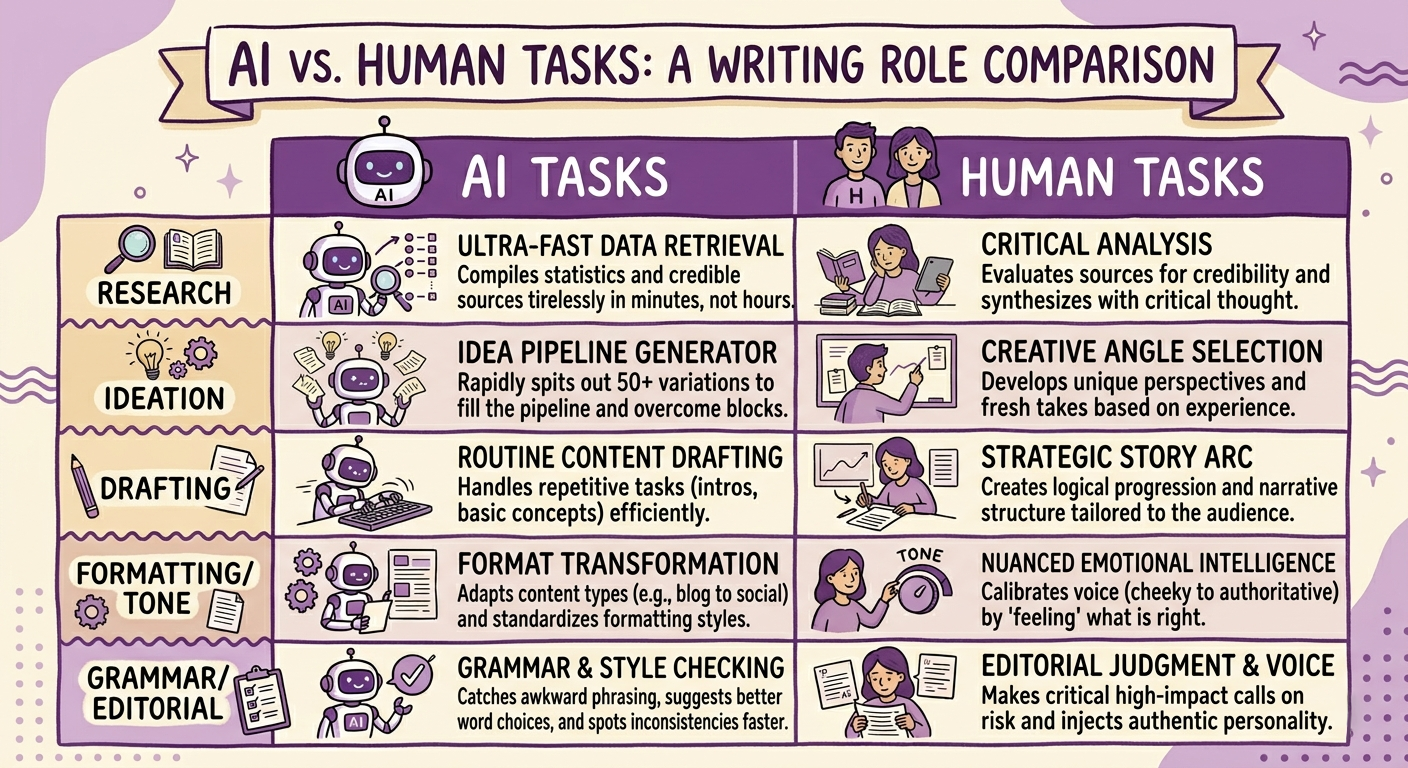
Where AI Absolutely Crushes It
- Research and data gathering. Need to compile statistics on content marketing trends from the last five years? AI can pull together credible sources in minutes instead of hours. It's like having an ultra-fast research assistant who never needs coffee breaks.
- Generating multiple ideas quickly. Stuck on headline options? AI can spit out 50 variations faster than you can say "writer's block." You're still the creative director choosing the best ones. AI just fills the idea pipeline.
- Drafting routine sections. Introduction paragraphs explaining basic concepts? Product descriptions for similar items? AI handles these repetitive tasks efficiently, freeing you for the creative heavy lifting.
- Reformatting and restructuring. Need to turn a blog into social posts or vice versa? AI excels at content adaptation and format transformation.
- Grammar and style checking. Beyond basic spell-check, AI catches awkward phrasing, suggests stronger word choices, and spots inconsistencies faster than human proofreading.
Where Your Human Brain Is Irreplaceable
- Crafting original angles and perspectives. AI draws from existing content. It doesn't have unique experiences or controversial opinions. Your fresh take on an overdone topic? That's all you.
- Nuanced messaging and tone. Want to be slightly cheeky but not offensive? Authoritative but approachable? These subtle tone calibrations require human emotional intelligence. AI might nail it sometimes, but you feel when it's right.
- Strategic decisions about structure and flow. Which section should come first? Where does this example work best? AI can suggest, but you understand your audience and the story arc you're building.
- Injecting personality and voice. Your quirks, your humor, your way of explaining things. These create connection with readers. AI can mimic voice, but authentic personality comes from lived experience.
- Making editorial judgments. Should this controversial point stay or get cut? Is this example actually helpful or just filler? These calls require human judgment about impact and risk.
The magic happens when you deliberately assign tasks to the right brain, artificial or biological. Don't ask AI to write something creative and original from scratch. Don't waste hours manually researching data AI can compile in seconds.
Smart collaboration means playing to each strength.
How to Make Social Media Carousels with AI
Let's zoom in on creating social carousels because they're deceptively tricky. A great carousel gets saved and shared; a mediocre one gets scrolled past in 0.3 seconds.
Starting with strategy (your job), before touching AI for your social media post, answer these: What's my hook? What's the payoff? Why should someone care enough to swipe through ten slides? If you can't answer these clearly, AI won't save you. I usually spend 10-15 minutes just thinking through the narrative arc. Slide one is the promise. Slides 2-9 deliver value. Slide 10 is the memorable takeaway or CTA.
Once you have your core message, prompt AI with something like
"Generate 10 hook ideas for a carousel about [topic] targeting [audience]. Focus on curiosity-gap and pattern-interrupt approaches."
Review the options. Most will be generic, but usually 2-3 spark better ideas in your brain. That's the real value.
I create a rough outline of each slide's focus: "Slide 1: Hook about common mistake. Slide 2: Why this mistake happens. Slide 3-7: Five better approaches..." Then I ask AI to "expand each slide into 20-30 words of conversational content." This gives me raw material to work with instead of starting from blank space.
Here's where most people fail, they take AI's output and run with it. Don't. Read every slide aloud. Does it sound like you? Would your audience actually find this interesting? I usually rewrite 60-70% of what AI generates, keeping the structure but injecting personality. Replace formal language ("utilize") with conversational words ("use"). Add unexpected details. Cut anything boring.
AI can suggest where to place text and visuals, but you make the final call on your social media post. What's the focal point of each slide? Where should the eye go first? These decisions dramatically impact whether people actually read your content.
Pro tip: For ideas on turning your rough draft into an effective AI prompt for refinement, our other blog on working with AI to turn drafts into effective prompts walks through advanced prompting techniques that get much better results than basic requests.
The Process: You start with the strategic vision: what's the one thing people should remember? You outline the flow. Then AI helps you fill in the middle slides efficiently while you focus on perfecting that crucial first slide and ensuring every slide maintains your authentic voice. You're the creative director; AI is your speedy content assistant.
How to Write a Good Blog Post with AI
Blogs are where AI can save you the most time or create the most generic content if used poorly. Here's how to use it right.
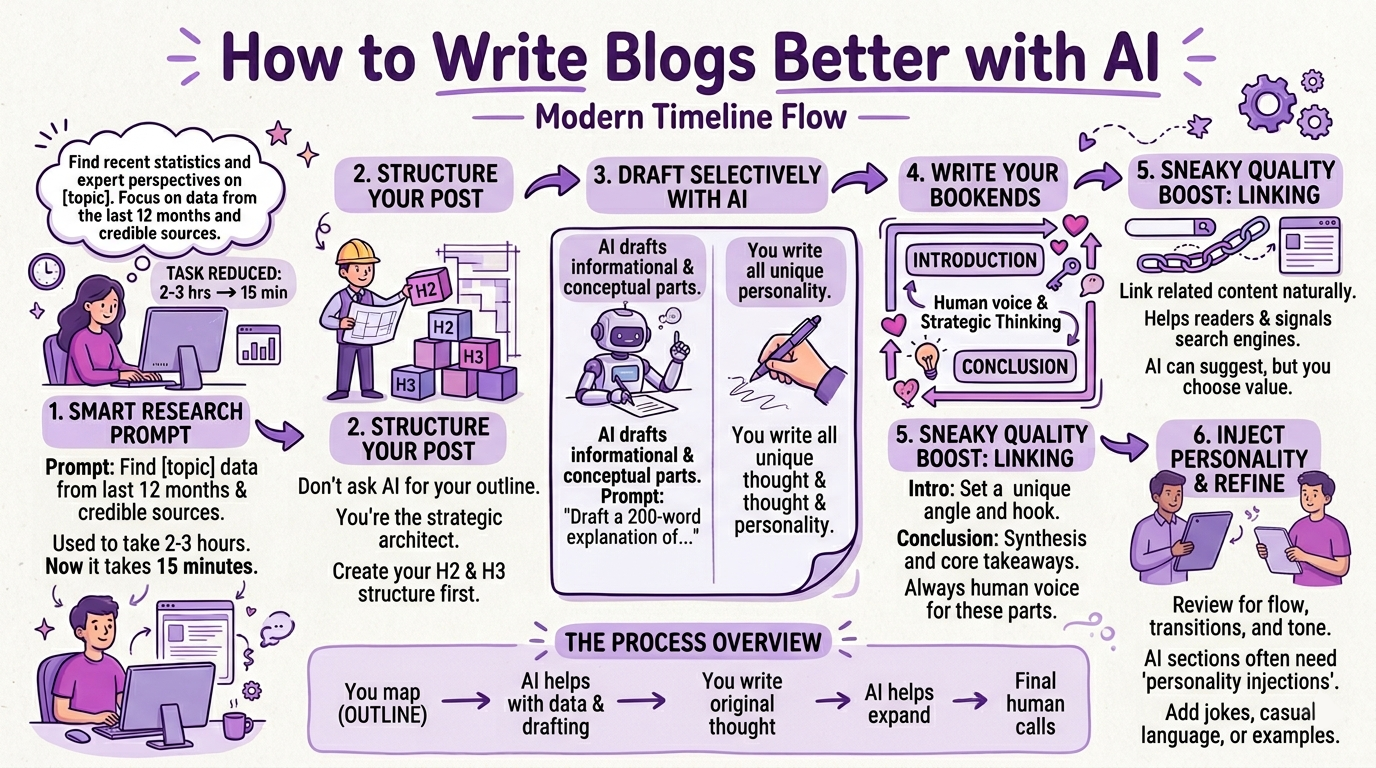
I start with a research prompt:
Find recent statistics and expert perspectives on [topic]. Focus on data from the last 12 months and credible sources.
This task used to take 2-3 hours of manual searching. Now it takes 15 minutes.
Don't ask AI to outline your entire blog. You know your audience and what story you're telling. Create your H2 and H3 structure first. Decide which points support your main argument and in what order. AI can suggest additional sections you might've missed, but you're the architect.
For sections explaining established concepts or presenting research findings, AI drafts efficiently. Prompt specifically: "Draft a 200-word explanation of [concept] aimed at [audience], focusing on practical implications." For sections requiring original thinking, unique examples, or personality? You write those from scratch.
Never let AI write these. The intro sets your unique angle and hooks readers with your perspective. The conclusion ties everything together with your synthesis and takeaways. These bookends frame the entire piece. They need your human voice and strategic thinking.
After combining AI drafts with your original sections, read the entire piece straight through. Does it flow? Are transitions smooth? Is the tone consistent? I find AI-generated sections often need "personality injections", adding a quick joke, replacing a formal phrase with casual language, or inserting a specific example. This editing pass is where good blogs become great ones.
The Process: You map the strategic territory—outline first, always. AI helps with research legwork and drafting informational sections. You write anything requiring personality or original thinking. AI helps expand and polish. You make final calls on everything.
For more on using AI effectively during the research phase, check out our blog on How to conduct research with AI. It covers advanced techniques for getting beyond surface-level information.
How to Write a Video Script with AI
Video scripts need to sound natural when spoken aloud—something AI often misses. Here's how to collaborate effectively.
What's the video about? Why will people watch? What's the payoff? These strategic questions shape everything that follows. I sketch a rough structure: Problem → Why it matters → Solution → How to implement → Takeaway.
The opening 15 seconds determines your retention rate, so never outsource this to AI. You need a hook that's surprising, relevant, and promises clear value. I write 5-10 different openings myself, say them aloud, and pick the one that flows best. AI can suggest variations afterward, but starting with human-written options works better.
AI for explanatory content. Need to explain a technical concept simply? AI excels here.
Prompt: "Explain [concept] in 100 words using everyday analogies and avoiding jargon. Target audience is [description]."
Review the output—if the analogy works, great. If not, ask for alternatives.
Writing for the ear, not the eye. This is crucial. AI tends to write how content reads, not how people actually talk. After AI drafts a section, read it aloud. Anywhere you stumble? Rewrite in simpler, more conversational language. Use contractions. Start sentences with "And" or "But." Break grammar rules that make speech sound stiff.
Identify 3-4 moments where you can add humor, make an unexpected observation, or share a quick personal story. These moments create connection and make your video memorable. AI can suggest where these might fit, but the actual content must come from you.
I have AI suggest B-roll ideas and visual metaphors: "Suggest 10 visual ideas to illustrate [concept] in a video." Some will be obvious, but a few usually spark creative directions I hadn't considered. Add timing notes yourself based on pacing, where to pause, speed up, or emphasize.
Final step: Perform the entire script. Record yourself if possible. Anywhere the language feels unnatural or you lose energy? Those spots need rewriting. The script should feel like enhanced natural speech, not a formal essay read aloud.
You nail down the concept and opening, these determine whether anyone watches past five seconds. AI helps flesh out explanatory parts and suggests visuals. You inject personality throughout and ensure it sounds natural when spoken aloud. Read it out loud yourself; if it feels stiff, you need more human polish.
Your Next Steps + Some Useful Tips
If you want to maximize the value of everything you create, build content ecosystems, not isolated pieces.
- Internal linking strategy. Every blog should link to 2-4 related pieces you've published. This keeps readers on your site longer and establishes you as a comprehensive resource on topics. When I mentioned researching with AI earlier, that wasn't accidental—I'm building a knowledge web where readers can go deeper on specific aspects.
- Topic clusters, not random posts. Group content around core themes. If you're writing about AI and writing, create supporting content on related aspects: research techniques, prompt engineering, editing with AI, etc. Link these together. Search engines love this topical authority approach.
- Repurposing strategically. That comprehensive blog? It's also 5 social posts, a carousel, a video script, and an email. AI makes repurposing efficient—just direct it to reformat for different platforms. You maintain quality by reviewing and adjusting tone for each platform's unique context.
- Update and interlink older content. When publishing something new, revisit older related posts and add links to the new piece. This keeps your content ecosystem fresh and interconnected. AI can help identify which older posts are most relevant for linking opportunities.
And here's something that'll make this entire process smoother: the right tools designed specifically for AI-human collaboration. It should come as no surprise that I use Yarnit for exactly this kind of work.
Our AI-powered document editor integrates AI assistance exactly where you need it without taking over your entire creative process, you stay in control while AI handles the heavy lifting. The Ask Yarnit feature is basically a team of AI agents that help with research, drafting, editing, and optimization right within your workflow. And if you need supporting visuals for your content, Dreambrush v2 can help you create custom infographics without leaving the platform.
The beauty of Yarnit is that it’s built by people who respect the division we've discussed throughout this piece, AI where it excels, human creativity where it matters. You're not fighting against the tool or working around its limitations. Everything flows naturally.
Words might be cheap now, but quality never goes out of style. Master the AI-human collaboration dance, and you'll produce better content faster than ever before.
Now go create something worth reading.


